
For certain kinds of WooCommerce stores it’s very important to show products in a table or list layout instead of leaving them in the default WooCommerce grid layout. A great WooCommerce product table plugin can dramatically improve shopping experience and boost sales on these stores. Whether you need a table layout or not depends on the kind of products you sell.
Product types that need a WooCommerce product table plugin
If your products have several key features that customers need to compare at a glance, then a product table layout becomes essential. A traditional product grid will be too slow and cumbersome for exploring products. It will force shoppers to click through to each individual product page just to compare specs or options, which is not ideal. This makes shopping difficult especially if you have several products in your shop. A table layout greatly simplifies searching for products in this case.
Examples of such shops:
- Spare parts (with properties like SKU, size, compatibility etc)
- Online restaurant menu (compare portions, prices, dietary labels)
- Wholesale catalog (bulk order, price comparison)
- B2B electronics (specs, stock, minimum order quantities etc)
In such stores product tables speed up shopping, ensuring customers don’t have to jump through hoops to compare and find products they need. All relevant details are visible at a glance in the table and easy to scan. You can create quick order pages with product tables where shoppers can compare items by their properties, select quantity and variations and add products to cart from the same page.
Product types that don’t need a table layout
For products where only name and image are important you don’t need a table layout. If shoppers don’t need to look up other product properties to compare a classic product grid can work just fine.
Examples of such shops:
- Art prints or posters, where the artwork is everything
- Clothing stores selling individual pieces, not bulk or wholesale
- Gift shops with unique, visually distinctive items
Here, shoppers are browsing by visuals alone, not comparing lots of features. So a straightforward grid will do. There are two exceptions here:
- If you are selling B2B or wholesale then you still need a separate table layout with details like sku, pricing offers, etc to help your business customers.
- In some cases a table or list layout can act as a great secondary layout. You can add a view switcher to your shop and let customers browse products in grid or table/list layout as desired.
Criteria for a great WooCommerce product table plugin
Most of the popular WooCommerce product table plugins will look similar at first. All of them can do the basics – show products in a table layout with properties in columns like images, prices, sku, add-to-cart buttons etc. They can all help you get started with a product table but the performance, look and feel of the final table will greatly differ based on quality of the plugin you’ve used.
Hence we need to carefully compare woocommerce product table plugins based on real-world criteria. This will help us figure out which plugins can create the best product tables for our Woo store.
Important features to compare when looking for a WooCommerce product table plugin for 2026
Below are the most important criteria for evaluating WooCommerce product table plugins. We will use these criteria to compare and score the most popular options.
- Layout flexibility
How much can we modify the table or list layout to meet your specific needs? Are we stuck with a rigid and basic table layout or does the plugin editor let us significantly re-design and customize the layout for our store. - Design control
How much can we change the table design using the editor facilities (without needing any custom CSS)? Can we re-style every element in the table to match our specific store branding and aesthetic? - Mobile usability
Does the plugin make it easy to shop from phones as well? Can we meaningfully customize the phone layout to improve UX based on our needs? - Navigation features
How powerful are the search and filter facilities in the plugin? Do we have options to control their layout and styling? - Integrations with 3rd party plugins
Will our product table work well with other popular 3rd party plugins to offer facilities like wholesale pricing, request a quote, compare products, advanced filtering, quick view, etc?
Comparing WooCommerce Product Table Plugins
Below, we compare the 3 most popular WooCommerce product table plugins, score them against the key features covered above, and provide an overall rating for each plugin.
WooCommerce Product Table PRO by WP Titan Labs
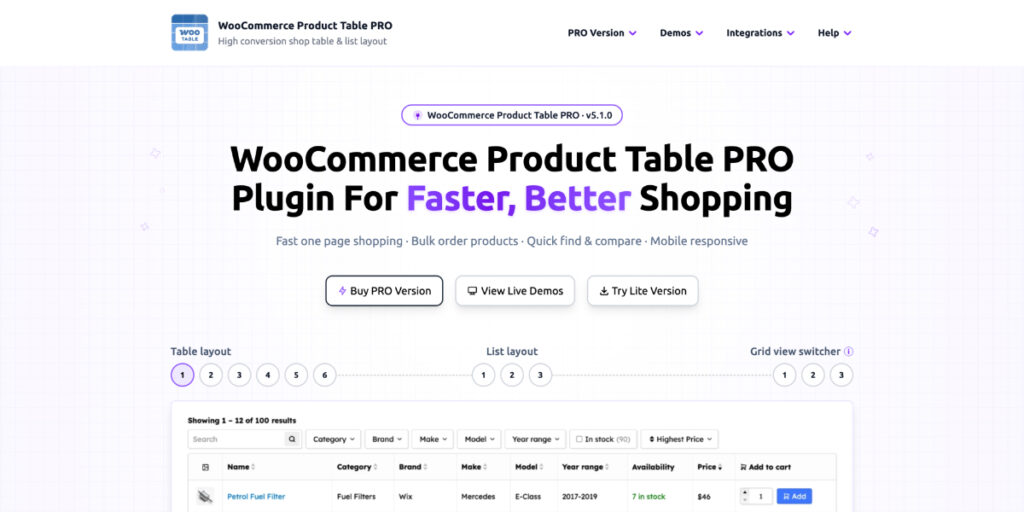
↳ Overall plugin score: 9.5/10
WooCommerce Product Table PRO is one of the strongest options for stores that need a fast, flexible product table or product list layout for WooCommerce. It offers deep control over layout, styling, mobile presentation, filtering, sorting and product navigation.
A Lite version is also available on WordPress.org as Product Table & List for WooCommerce. This is useful because store owners can start with the free plugin, test the workflow with their own products, and upgrade later if they need more advanced layout control, styling, filters, mobile options or performance features.
↳ Layout flexibility score: 9/10
The layout editor is the plugin’s biggest strength. It can create a simple product table quickly, but it also supports much more advanced layouts using nested rows and columns. This allows you to place multiple product elements inside the same column exactly where you need them.
This gives store owners far more creative freedom than a basic spreadsheet-style table. You can build compact order forms, visual product lists, catalogue layouts, technical comparison tables or hybrid table-list designs depending on your product type.
The plugin also includes a dedicated list layout mode, where each product row can have its own outer border and spacing between rows. This creates a true product list or card-style catalogue rather than forcing every layout into a rigid table structure.
Another smart feature is conditional element visibility. Table elements can be shown or hidden based on product properties such as category, attribute, stock status or availability. This makes it possible to create dynamic row templates that adapt automatically to different products.
You can also create accordion-style tables where clicking a toggle reveals additional product information in a separate row below. Sticky columns are supported too, so key information can remain visible while the rest of the table scrolls horizontally.
↳ Design control score: 10/10
The plugin offers extensive design control, with hundreds of styling options across the table, rows, columns and individual elements. You can style the table itself, customize each product element, and define global table styles using a live front-end style editor.
This makes it much easier to match the product table or list to your store’s branding without relying heavily on custom CSS. Whether you want a clean technical catalogue, a polished food menu, a wholesale order form or a visual product list, the design system gives you the flexibility to make it feel intentional and on-brand.
↳ Mobile usability score: 10/10
Mobile handling is excellent. Instead of offering only a basic responsive table, the plugin gives you several ways to present products on phones.
You can keep a traditional table layout with horizontal scrolling, use sticky columns to keep key product information visible, create accordion-style mobile layouts, or design compact product cards with images, titles, prices, buttons and extra information arranged cleanly.
The nested row-and-column system also works well for building custom mobile layouts, so you are not locked into one generic responsive format. This is especially useful because different stores need different mobile experiences. A spare-parts catalogue, restaurant menu, wholesale order form and fashion store should not all be forced into the same layout.
Overall, the mobile system feels carefully thought out and gives store owners enough control to create a polished buying experience on smaller screens.
↳ Navigation features score: 9/10
For a product table plugin the included navigation facilities are very robust. Some notable USPs: searching products by custom set of properties, sorting by attributes, secondary level sorting, range slider for custom fields, filter by ACF fields, infinite scroll. It also supports automatically hiding empty filter options and result count for each filter option.
You can also control the layout of your table’s navigation area. Filters can be placed above the table or inside a sidebar to the left or right. And the navigation header area supports columns and rows for more nuanced layout. This makes it easier to organize complex filter sets without making the interface feel messy.
On phones, filters can be shown in a popup for a cleaner mobile experience. This keeps the product list focused while still giving customers access to detailed filtering options when needed.
The filtering and navigation tools are strong overall, especially for stores with larger catalogues or products that need to be searched, filtered and compared quickly.
Barn2 WooCommerce Product Table
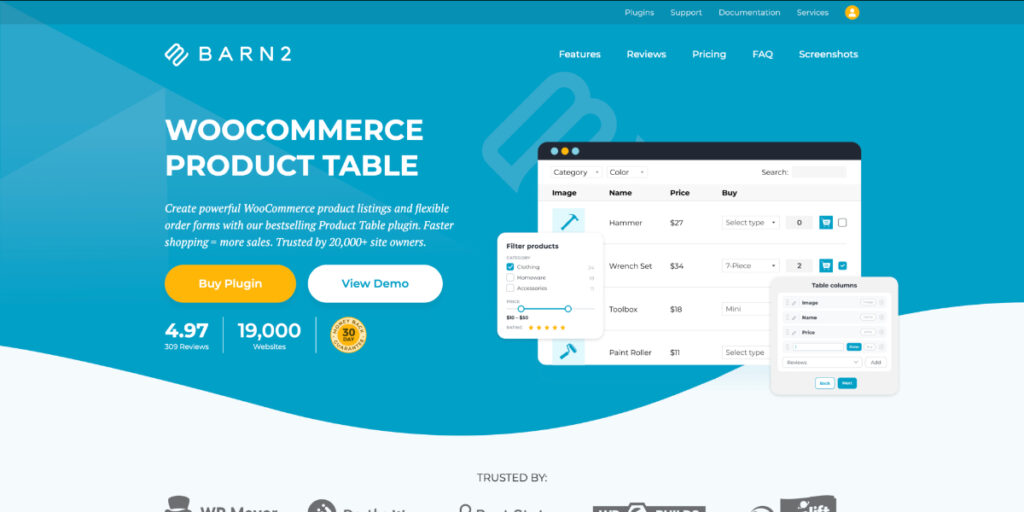
↳ Overall plugin score: 6/10
Barn2’s WooCommerce Product Table is one of the more widely recognized options, helped by strong marketing and an established presence in the WooCommerce plugin space.
The plugin is simple to set up and works well for basic product table needs. It also has clear documentation and connects with Barn2’s wider ecosystem of paid WooCommerce plugins.
However, the product table plugin itself is comparatively limited. It is best suited to straightforward table layouts rather than stores that need deeper layout control, advanced styling, polished mobile views or more flexible product navigation.
Barn2 does not offer a free or Lite version of its product table plugin, although it does provide a hosted demo where users can try the plugin before purchasing.
↳ Layout flexibility score: 7/10
Barn2’s layout editor is mainly built for simple product table layouts. If all you need is a clean table with standard product data in columns, it does the job.
Recent versions have added more layout flexibility, including the ability to place multiple elements inside the same table column and create nested rows. However, these features still feel limited compared to more advanced layout builders. The experience is not as smooth, visual or flexible as it needs to be for stores that want a more polished catalogue layout.
This matters because many WooCommerce stores do not need a pure spreadsheet-style product table. They need a more modern product list, order form or catalogue layout where product images, titles, prices, descriptions, attributes and buttons can be arranged in a more deliberate way.
Barn2 does allow you to show additional product information in a child row, but the presentation feels basic rather than like a polished accordion layout. You can also create a more list-like layout by stacking multiple elements inside a column, but there is no proper spacing between product rows and no strong card-style row design.
Overall, Barn2 is fine for a basic table, but it feels restrictive when you want a more customized or visually polished product layout.
↳ Design control score: 6/10
Design customization is quite limited. Barn2 provides a modest set of broad styling options, mostly at the full-table level. You can adjust the basics, but you cannot deeply style individual elements inside the table.
Design changes are also applied globally, with no strong per-table styling system. There is no live front-end style editor, and the available presets are limited to simple theme choices such as default, neutral or dark.
For anything more specific or brand-driven, you will likely need custom CSS. This is enough for simple stores that only need the table to roughly match their color palette, but not enough for store owners who want a distinctive, highly customized product table or list design.
↳ Mobile usability score: 4/10
Barn2’s table can be made responsive, but the mobile options are fairly basic.
On smaller screens, you can either keep the full table with horizontal scrolling or hide lower-priority columns behind a “+” icon that expands additional product information in a child row or modal.
That may be acceptable for simple catalogues, but it feels dated compared to modern mobile commerce layouts. Many stores now need product tables to transform into cleaner card-style layouts on phones, with images, product information and purchase buttons arranged for easier browsing.
Barn2 does not offer a true card-style mobile layout, sticky column option or custom mobile element arrangement. Stores that need a polished mobile buying experience may find the options too limited.
↳ Navigation features score: 5/10
The core Barn2 WooCommerce Product Table plugin includes only basic navigation features, falling far behind most competitors in this department. For more advanced filtering facilities they require purchase of their own WooCommerce Product Filters plugin.
There is limited control over arranging the built-in navigation filters, no dedicated sidebar filter layout, no advanced mobile filter popup, and little flexibility over the structure or presentation of the navigation area.
A search option is provided by you cannot finely define which product properties the search should check, and there is no secondary sorting system for more advanced ordering logic.
The built-in filters also lacks adaptive filtering features, such as dynamically hiding empty filter options as customers make selections.
Overall, Barn2’s navigation is acceptable for very basic use cases, but stores with larger catalogues or more complex filtering needs will likely find it limited.
Woo Product Table by CodeAstrology

↳ Overall plugin score: 6.5/10
Woo Product Table by CodeAstrology is available in both PRO and free versions on the WordPress repository. The free version was once very popular, but its active installs have significantly declined over the past couple of years amid increasing competition.
The PRO version offers a wide range of features for its price point. However, it does not feel like a premium layout builder compared to the stronger options in this category. The workflow and presentation often feel crude and buggy reflected by several recent poor user reviews on TrustPilot.
↳ Layout flexibility score: 7/10
For very basic product tables, the plugin works reasonably well. However, the layout system becomes harder to manage once you move beyond simple tables. Placing multiple elements in the same row is possible, but it can feel clunky. Given the lack of control arranging elements cleanly would require significant custom HTML work.
A list like layout is possible but creating a clean layout would require a lot of tinkering. Also it cannot provide gap between product rows or border around the rows to create separate cards for a proper list layout. Nor is it possible to create nested columns or change gap between inner rows.
In general the editor lacks a smooth visual connection between what you are configuring and what appears on the front end. This makes it harder to build more sophisticated layouts confidently.
↳ Design control score: 6/10
Woo Product Table by CodeAstrology provides more styling control than some simpler table plugins like Barn2. You can adjust common table-level styles, column level styles. There are even some styling options for individual table elements.
That said, the default table aesthetics feel quite crude. Front-end results can look rough without a lot of additional styling work. The available style options are hard to configure as they’re text input fields instead of options to select style values so you require CSS knowlege and even then there’s additional work invovled. The style system feels underworked.
↳ Mobile usability score: 6/10
On phones you can show the table in a standard multi column layout, same as desktop or switch to a card view where each product is presented in a separate card with its own borders which is good.
But beyond that mobile responsive strategy is fairly limited. In fact you can see the plugin demos often look broken on phone view. So the plugin stability in this regard is questionable.
For very simple tables their phone view facilities can work out okay. But there simply aren’t enough options and polish to create a premium shopping experience on phones without a lot of additional customization.
↳ Navigation features score: 7/10
Woo Product Table by CodeAstrology provides several navigation options, and it is possible to create a reasonably neat filter/search layout on laptops and larger screens. You can choose which product properties the search should look through, add filters, use sidebar filters, and enable infinite scroll.
However, there is one major weakness: column heading sorting only sorts the products on the current table page, instead of sorting across all products in the table. This is a serious limitation because proper product sorting is essential for most WooCommerce stores. If a customer clicks to sort by price, title, SKU or another column, they expect the full product set to be sorted, not just the rows currently visible on that page.
Infinite scroll is a useful inclusion, but the rest of the navigation system feels uneven. The sidebar filter option exists, but it can be impractical to set up cleanly. Mobile navigation is also limited, with no polished filter popup system for phones.
The plugin also lacks adaptive filtering, so empty filter options are not automatically hidden as customers make selections. Overall, the navigation features are decent on paper, but important limitations make the system feel less reliable for serious product catalogues.
Conclusion
While there are a lot of serviceable options for creating product tables WooCommerce Product Table PRO by WP Titan Labs stands out as the clear winner when it comes to creating the best product table or list layout for your site. It is the only product table plugin available today that combines a widely used free Lite version, modular nested layouts, deep per-element styling with live preview, multiple dedicated mobile strategies, powerful filter facilities and a smooth, modern workflow. All this provided at a very reasonably price point. How wonderful!