QUICK LOOK
See all variations together and easily scan their important properties.
WooCommerce Product Table PRO · v5.7.6
Let shoppers compare product variations in a clean, searchable table and add to cart faster. Perfect for stores with size, color, dimensions, or any large variation sets.
Replace dropdowns
Search, sort & filter
Faster bulk ordering
Trusted by 10,000+ store owners worldwide
Expert support you can rely on
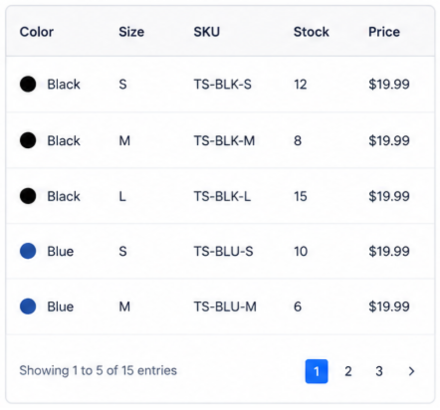
See all variations together and easily scan their important properties.
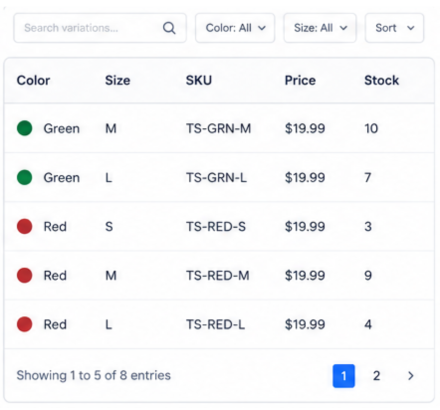
Search, sort, and filter to reach the desired variation much faster.
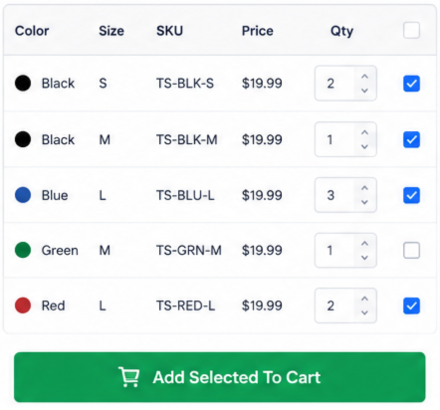
Select multiple variations, set quantities, and bulk add to cart in one go.
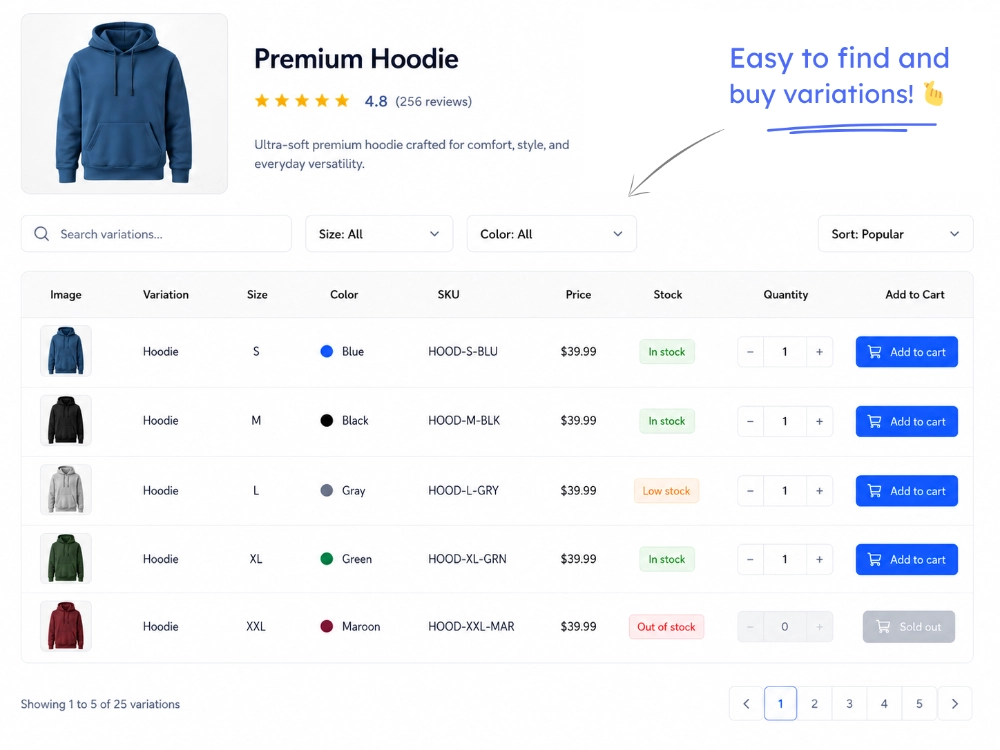
Click on any demo below to view it live
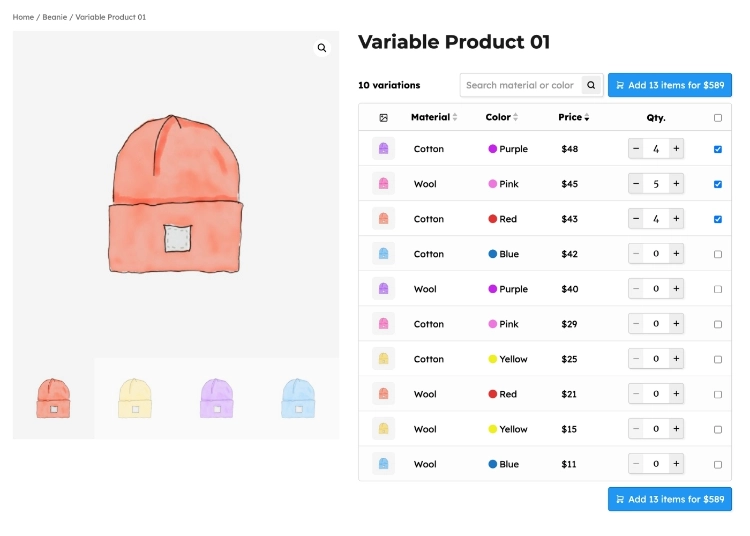
Replace the default WooCommerce variation form on product pages with a clean, structured variation table so shoppers can compare sizes, colors, prices, and bulk add products to cart.
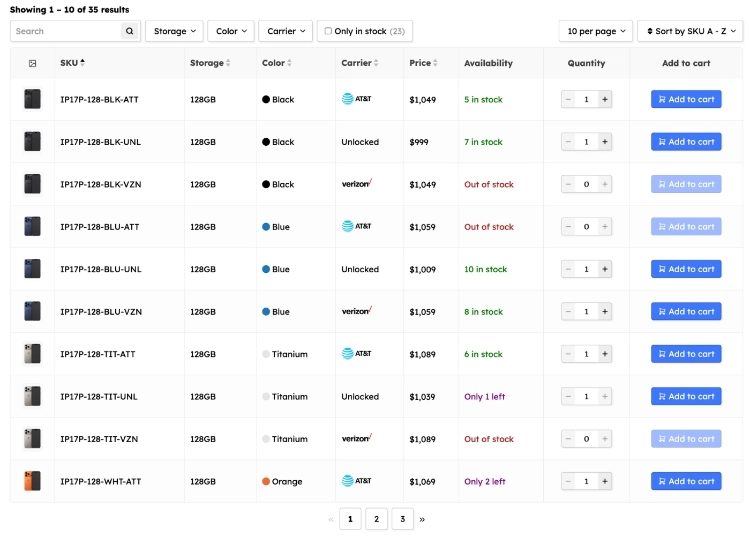
For large sets of variations with multiple properties, add the variation table to the product description so visitors can easily browse products and quickly find what they want.
Built to be easy for anyone to use and create tables that meet their site needs
Start from a blank layout or pick a preset to launch a fully responsive variation table in seconds. No custom code required.
Fine-tune columns, labels, and colors in the editor. Show SKU, attributes, images, stock, price, etc at a quick glance.
Replace the default variation form automatically. Optionally assign tables based on product category.
See the step-by-step guide in our WooCommerce variation table documentation .
WooCommerce Product Table PRO
Includes facilities for variation tables, regular product tables, lists, quick order and more
Put sizes, colors, SKUs, stock, and prices in one table. Much easier for shoppers to scan than WooCommerce's default dropdowns, especially when you have a large variation set.
Variation tables are included in our plugin 'WooCommerce Product Table PRO' along with many other useful facilities. Builder for WooCommerce' along with many other useful facilities.
Shop & category tables
Replace the default WooCommerce grid with table and list layouts.
Table, list & grid views
Good for spare parts, menus, wholesale, electronics, and more.
Smart search & filters
Add filters to sidebar or above-table. Filter and search by category, attribute, price, etc.
Complete design control
Live style editor, custom columns, and 50+ product property elements.
50+ integrations
Wholesale, quick view, compare, request quote, and plenty more.
Bulk ordering UX
Quantity fields, checkboxes, and one-page shopping for B2B stores.
30+ starter templates · 50+ plugin integrations · 30-day refund guarantee
Common questions about variation tables, setup, and everyday store use cases.
A variation table puts every product variation in its own row with size, color, SKU, price, stock, and image visible at once. That beats clicking through WooCommerce's default dropdown menus, especially for clothing, spare parts, wholesale packs, or any catalog where people need to compare options before buying.
Create a product table in WP Admin → Product Tables → Add new table → then enable the variation table option in the table's Query tab (Variation Table → Enable variation table). Or add product_variations="true" and ids="123" to your shortcode, where 123 is the parent variable product ID. The table will pull in that product's child variations as individual rows.
Yes, and a lot of stores do exactly that. Go to Product Tables → Settings → Show variation table on product page → here you can set rules for which tables appear on which variable product pages (by category or other criteria). You can place the table next to the product summary, above product tabs, or in a dedicated new tab. The plugin detects the current product and shows its variations automatically.
Yes. Every variation gets its own row with image, attributes, SKU, price, stock status, quantity field, and add-to-cart button. You pick the columns in the same table editor used for regular product tables. There are 50+ property elements to choose from.
Whatever helps shoppers decide: variation thumbnails, attribute columns (size, color, material, pack size, etc.), SKU, regular and sale price, stock status, custom fields, download links, and more. Add, remove, or reorder columns as needed. The live style editor lets you tweak buttons, links, images, and text to match your brand.
Yes. Variation tables get the same navigation tools as regular product tables: search, column sorting, attribute filters, and pagination. Even catalogs with thousands of variations stay manageable. Shoppers can type a SKU, filter by size or color, and jump to the row they need.
Yes. Each row can have a quantity selector and add-to-cart button, so customers can order several variations in one go. Wholesale, B2B, catering, and spare-parts stores use this a lot when buyers need multiple SKUs in a single order.
Yes. Build a master variation table with all the attribute columns your catalog might need, then add hide_empty_columns="true" to the shortcode. Columns that don't apply to the current variations hide automatically, so one template can work across products with different attribute sets.
Yes. Add a Shortcode element to your theme builder product template and paste the variation table shortcode, but leave out the ids attribute. The plugin picks up the current variable product on the page and shows its variations. Works with Elementor, Divi, Beaver Builder, Visual Composer, and similar tools.
Yes. Use the variation_skus shortcode attribute to list the SKUs you want, separated by commas: product_variations="true" variation_skus="sku-a, sku-b". You can also target variations by parent product ID (ids="123, 124"), category (category="clothing, accessories"), or other query options when only a subset should appear.
Yes. Set the table's Initial orderby to Menu order (ascending) in the Query tab. Then drag and drop variations on the variable product's edit screen (Product data → Variations) to set the order you want. The table follows that same sequence.
No. Variation tables are for product variations only. Each row is a single variation of a variable product. Simple, grouped, affiliate, and other product types can't go in the same table.
Yes. Variation tables are built into our world's best WooCommerce product table plugin called 'WooCommerce Product Table PRO'. No separate plugin to buy. Not sure yet? Every purchase comes with a 30-day full refund policy, and support is there if you need help getting set up.